

What is SOGS, anyways?
Tue Sep 30 2025 by Martin PialaA Gaussian Splat is a volumetric rendering primitive particularly good for digital reconstructions of real world scenes. A typical model has hundreds of thousands, sometimes millions of splats.
Each splat consists of position, rotation, scale, colour, opacity, and spherical harmonics. Position stores x, y, and z coordinates. Rotation stores the x, y, z, and w values of a quaternion. Scale stores x, y, and z values along each axis. Colour stores red, green, and blue values. Opacity stores the alpha value, where 0 is invisible and 1 is opaque. Spherical harmonics usually store 9-45 parameters describing view-dependent effects.
An attentive reader can spot that with such a big number of parameters per splat, the size of the model quickly explodes. Raw models are naively represented as PLY files with every parameter stored as a 32bit, or 4 byte, number, but that doesn't cut it in production. We need a good way of compressing splats while maintaining visual quality.
Self-Organizing Gaussians
The paper Compact 3D Scene Representation via Self-Organizing Gaussian Grids proposes a way of storing and organising Gaussian Splatting models that regularly achieves 20x compression.
Encoding data as an image
The paper cleverly exploits a well known data structure that is commonly used to encode, store, compress, and transfer relatively large amounts of data. It's an image.
An image is essentially a 2D grid of pixel intensity values. Each pixel can carry either one, three, or four values for grayscale, RGB, and RGBA respectively. But what would happen if instead of colours, we stored Gaussian Splatting data in an image?
Below you can see all base colours of this model stored as pixels of an image:
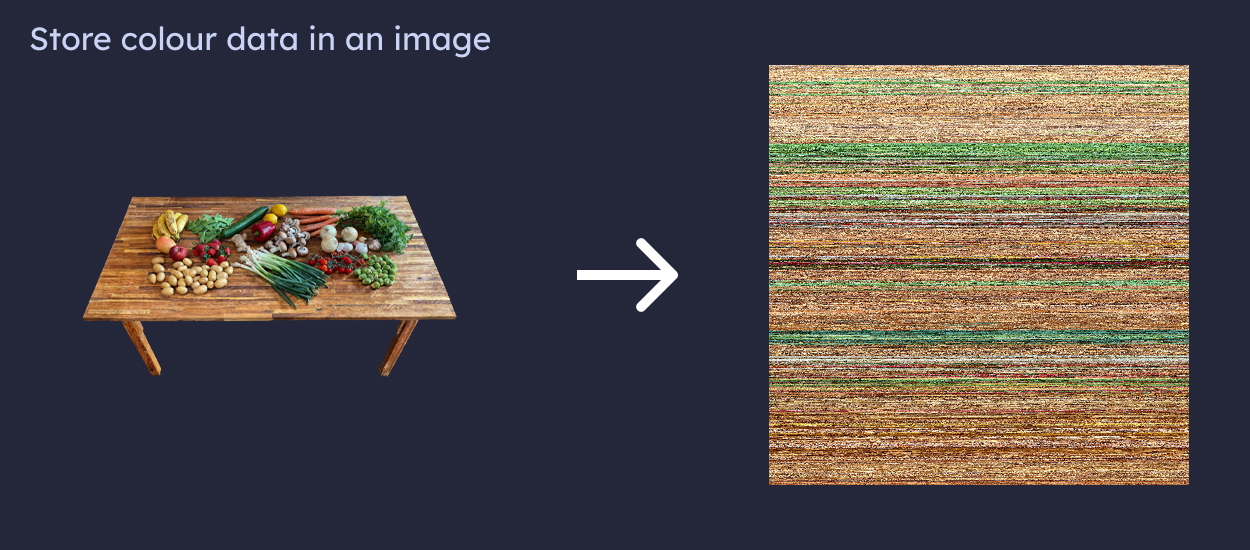 Model by Zoltanfood - www.zoltanfood.com
Storing information as pixel data allows us to tap into decades of image compression research. Just save the image data as JPEG or WEBP. But there's a catch.
Reshuffling
Image compression relies on patterns and similarities, which are very often present in real pictures. Neighbouring pixels are usually of a similar colour, patterns of colours often repeat, and image compressors use this to extract only the most essential information required to reconstruct the original pixel data when we need to decompress the image again.
However, storing arbitrary and noisy data, which Gaussian Splatting parameters are, is not going to give image compression too much to work with.
Here's where the self organisation of splats comes into play. As it was presented in the original paper, we can reorder the data in a way where similar values are close to each other.
For this, a Parallel Linear Assignment Sorting (PLAS) algorithm is used.
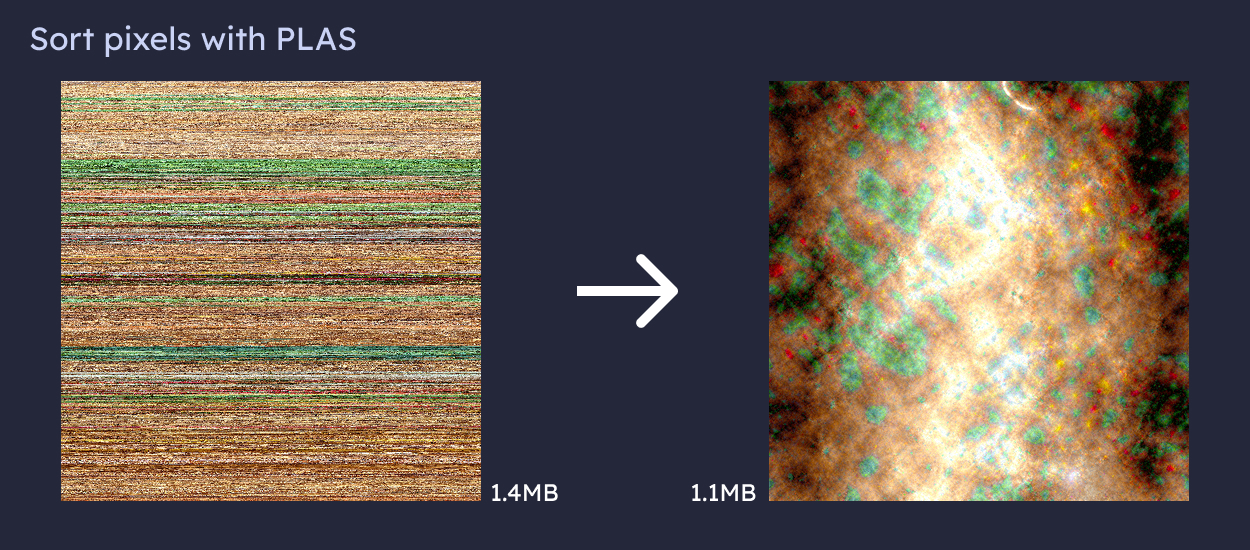
The two images above hold the same information. But different ordering allowed us to save 0.3MB, or 23%, for free. But there's a catch again.
Global reshuffle
Let's assume we store all parameters of a Gaussian Splatting model as a set of images, reshuffle all of them to compress them further and send them over the network. It's unlikely that two images would have the same optimal reshuffle order. To reconstruct the 3DGS model on the client, we would need to know the relative order of all pixels across all images, rendering the reshuffling method impractical. Unless we reorder pixels globally.
We can stack all image slices on top of each other, and reshuffle them treating it as one big image with more than 4 channels. Then, we can slice it up again into groups of 3-4 channels and save them as WEBP images again.
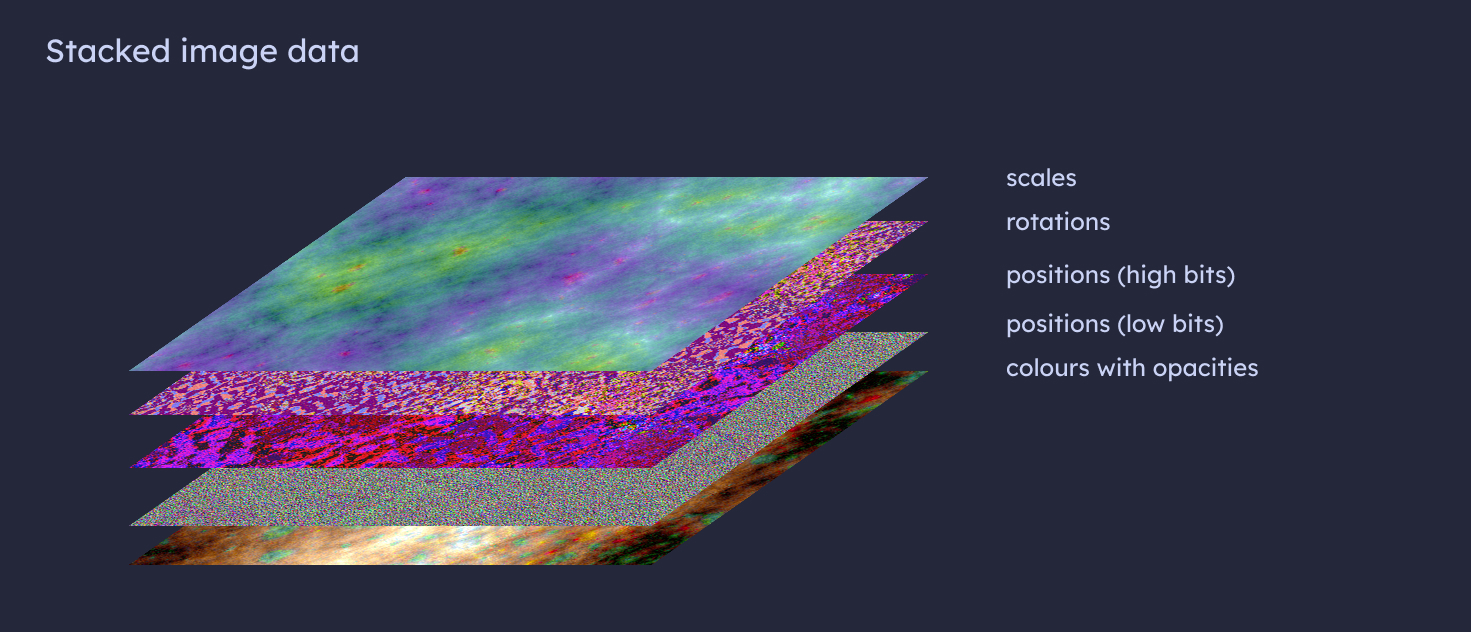
You may have noticed that positions appear twice in the stack. It's because we can only store 8 bits per channel in a standard image. This level of precision is sufficient for all parameters except for positions. So we store positions using 16 bit numbers spread across two images. One has the upper, or high, 8 bits, the other has low 8 bits of the value.
But what about spherical harmonics?
The PLAS sorting algorithm is sorting all channels simultaneously, which is a computationally expensive operation and impractical for all spherical harmonics parameters. Remember, there can be 40 or more SH parameters per splat. So we need another complementary method.
Empirically, a simple lookup table works reasonably well for all SH parameters. We can precompute a smaller table of most common combinations of SH parameters and assign each splat a predefined combination.
The tricky bit now becomes finding this lookup table that represents the current SH parameters as closely as possible to minimise the information loss. Luckily, this is a well known problem called K-Means clustering.
K-Means clustering is about finding a predefined number, K, of clusters of data that best describes high-dimensional data. Assuming a model has 3M splats, each with 44 SH parameters, we want to find K clusters, each having 44 values and K ideally being much smaller than the original 3M. In practice, K being 12-16 thousand works fairly well.
This produces two data artifacts: a matrix of size K by number of SH parameters, and a lookup table with one index per splat. We can, once again, store both as an image.
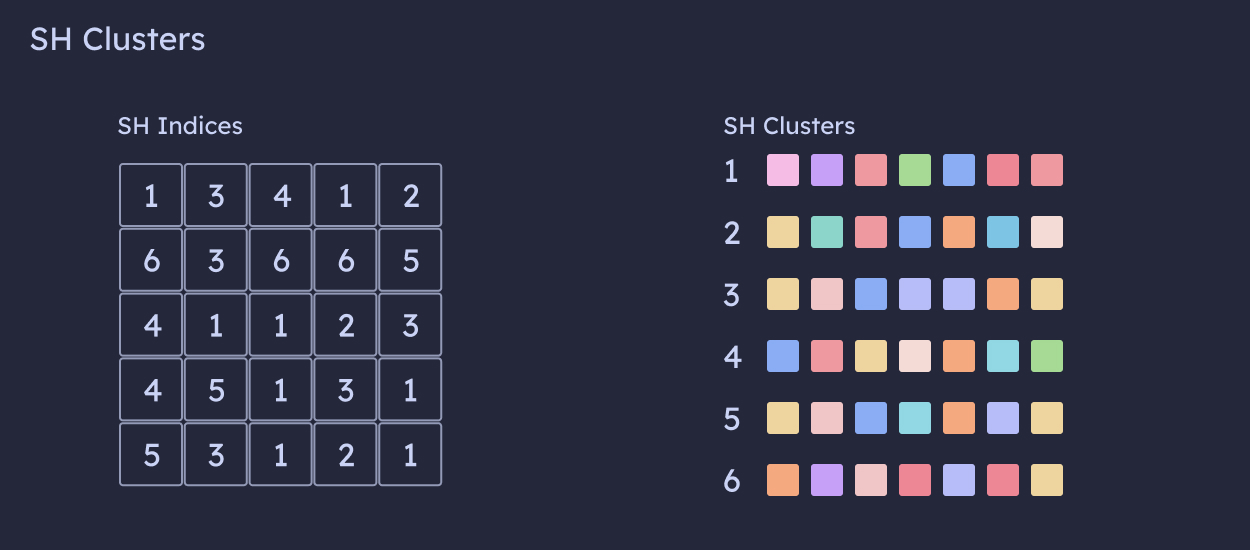
Even though this is a lossy compression, minor variations in SH parameters are rarely observable and we can always tune the size of K if necessary. And just like this, we compressed the splats to around 5% of their original size.
The need for a GPU
Unfortunately, all this work is computationally expensive, especially PLAS sorting and K-Means clustering. However, these operations benefit greatly from parallelisation and specialised hardware built for large scale parallel processing, usually graphics processing: a GPU.
A compression of a model with 3M splats can easily take 1-2h on a high end Intel or Apple M-series CPU. However, it takes only 5-10 minutes even on a budget-friendly GPU.
Fortunately, decompression is much faster. Reconstructing a compressed model happens in a moment on the client, even on modest hardware, requiring only simple lookup operations and standard image decoding.
Try now in Blurry
If you want to get your hands dirty and have a spare GPU to use, I recommend exploring this SOGS repository. For those who prefer a ready-made solution, SOGS-level compression with some extra goodies is available for free at Blurry.